Most people meet Claude Code the same way: they open a terminal, type a request, watch it edit some files, and close the window. That's the demo. It's genuinely useful and it's also the least interesting thing the tool does.
The interesting part is that almost none of it requires you to be there. Underneath the chat loop there's a whole trigger surface — events, timers, cron, CI webhooks — and once you've wired even one of them up, the mental model shifts. You stop thinking of it as a thing you talk to and start thinking of it as a thing you configure. This is a tour of that surface, roughly in order of how far it gets from a human sitting at a keyboard.
Layer 1: Hooks — react to events inside a session
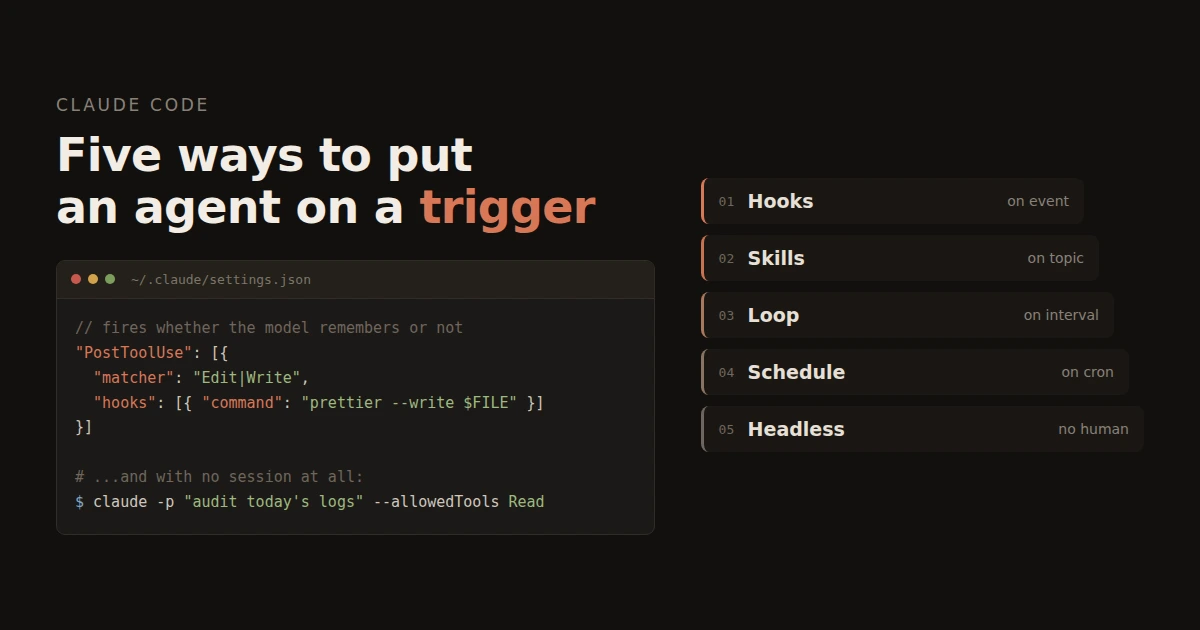
Hooks are shell commands bound to lifecycle events, declared in settings.json. The important detail: the harness runs them, not the model. That distinction is the whole reason they exist.
If you write "always run the formatter after you edit a file" into a memory or a CLAUDE.md, you're asking the model to remember. It usually will. Usually is not a guarantee, and the failures are silent. A hook is deterministic — it fires whether the model was paying attention or not.
{
  "hooks": {
    "PostToolUse": [{
      "matcher": "Edit|Write",
      "hooks": [{ "type": "command", "command": "npx prettier --write \"$CLAUDE_FILE_PATHS\"" }]
    }]
  }
}
The events worth knowing: PreToolUse, PostToolUse, UserPromptSubmit, Stop, SubagentStop, SessionStart, Notification, PreCompact. A PreToolUse hook can also block — exit non-zero and the tool call is refused, with your stderr handed back to the model as feedback. That's your guardrail layer. "Never touch anything under deploy/prod/" is six lines of JSON, and unlike a politely-worded instruction, it holds.
Layer 2: Skills — trigger the model, not the harness
A skill is a folder with a SKILL.md in it. The model reads every skill's one-line description and invokes the matching one when a task fits. That description is the trigger mechanism — there is no separate routing config, no regex, no registry. Vague description, unreliable firing.
This is the layer people underuse. If you have a deploy checklist, a code review rubric, a "how we write migrations here" doc — those aren't documentation, they're triggers waiting to be written down. Put the keywords a user would actually type into the description and the skill fires on its own.
Layer 3: Loops — recurring, but the session stays alive
/loop 5m /check-deploys reruns a prompt or slash command on an interval in the current session. Omit the interval and the model paces itself: after each pass it picks the next delay based on what it's waiting for — a fast poll for a CI run that turns over in ninety seconds, a twenty-minute idle tick when nothing's moving.
This is the ambient-monitoring layer. It's for the half hour where you want something watched but don't want to watch it. Close the terminal and it's gone, which is a feature — loops shouldn't outlive your attention.
Layer 4: Schedules — cron, but in the cloud
/schedule creates routines that run on Anthropic's infrastructure on a cron expression. Your laptop can be shut. It also handles one-shots: "run this once at 3pm tomorrow."
The obvious uses are the boring ones, and they're the ones that pay: a 7am pass over yesterday's error logs, a weekly dependency audit that opens a PR only if something's actually stale, a nightly check that every service on a box is still up.
Layer 5: Headless — no session, no human, no terminal
This is the real automation story and it's just the CLI:
claude -p "review today's nginx errors and open a GitHub issue if anything is new" \
  --output-format json \
  --allowedTools "Read" "Bash(grep:*)" "Bash(gh issue:*)"
That line goes in a crontab, a systemd timer, a CI job, a git hook. --output-format json makes it parseable, --allowedTools fences what it can touch, --resume gives it continuity across runs. From here it's not an assistant any more; it's a unix process that happens to reason.
Two inbound variants are worth naming. The GitHub Action lets @claude in a PR comment kick off a run — a trigger fired by a teammate, not a timer. And the Agent SDK (Python and TypeScript) exposes the same engine to your own code, if you'd rather own the loop than shell out to it.
Choosing a layer
| You want | Reach for |
|---|---|
| "Every time a file is edited, do X" | Hook (PostToolUse) |
| "Never let anything touch prod" | Hook (PreToolUse, blocking) |
| "When I ask about Y, follow this playbook" | Skill, with a keyword-rich description |
| "Watch this while I work" | /loop |
| "Run at 7am whether I'm here or not" | /schedule, or claude -p in cron |
| "React to a pull request" | GitHub Action |
The part nobody warns you about
Every layer here removes a human from a loop that used to have one, and the confirmation step goes with them. A hook that auto-formats is fine. A cron job holding a token that can push to main is a different object entirely — it's a deploy pipeline with a language model in it, and it deserves the paranoia you'd give any other deploy pipeline.
Scope the tools. Read the logs for the first week. Start with something whose worst-case failure is a wasted five minutes, not a rolled-back release.
Where to start
Pick the smallest annoyance you have — the lint you keep forgetting, the log file you check every morning out of superstition — and automate exactly that one. The value isn't the five minutes saved. It's that after the first one works you start noticing how much of your week is trigger-shaped.
Docs: https://code.claude.com/docs Hooks reference: https://code.claude.com/docs/en/hooks
No comments yet