Most people choose a password manager the way they choose any app: they compare features and pick a product. There is one corner of the field where that instinct is wrong, and it is the corner where nobody but you holds your vault. There you choose a file format first, and the apps become interchangeable.
What KDBX is
KDBX is the encrypted database file that KeePass writes, and that roughly a dozen unrelated programs read and write too. One file holds your entries, groups, attachments, history and metadata; the whole thing is encrypted with a key derived from your master password, a key file, or both. The extension is .kdbx, and the format is specified publicly rather than reverse-engineered.
That last point is what makes the rest of this article possible. Because the specification is open, KeePassXC, KeePassDX, KeeWeb, Strongbox and the others are not clones or importers — they are independent implementations of the same file.
Why the format outlives the app
A managed password service is a relationship with a company: it can raise its price, change its terms, get acquired, or shut down, and your data moves only as fast as its export button. A KDBX file has none of those properties, because there is no server and no account. The file is on your disk, and every conformant program can open it.
This is not theoretical. KeeWeb has not shipped a stable release since 2021, MacPass last tagged one in 2022, and neither event cost their users anything — they opened the same file in a different app the next morning. That is the whole argument for this category, and it is the argument the comparison of every kind of password manager sorts on.
What is actually inside the file
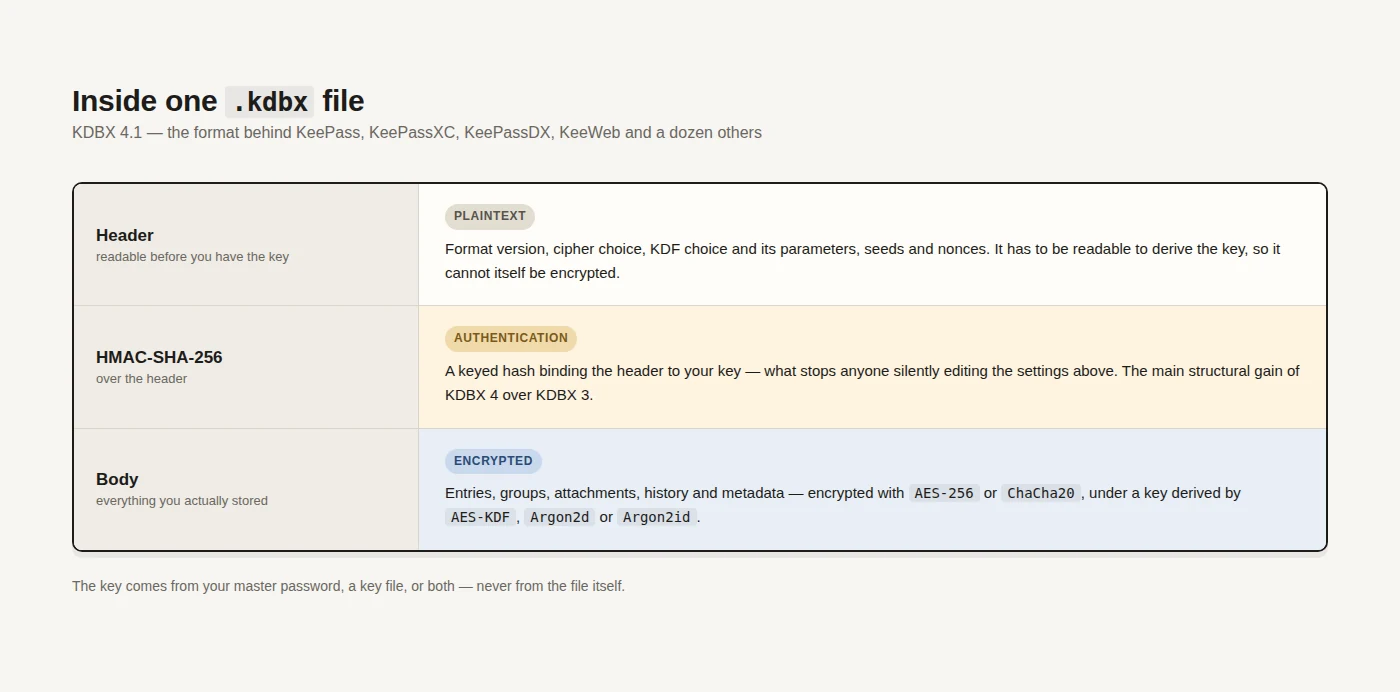
The KDBX 4.1 specification is worth skimming even if you never implement it, because it explains what your master password is really protecting. A .kdbx is a small plaintext header followed by an encrypted body, with a keyed hash binding the two together.
- A cipher encrypts the body. KDBX 4.1 defines two: AES-256 in CBC mode with PKCS#7 padding, and ChaCha20 as specified in RFC 8439.
- A key derivation function turns your password into that key. The spec defines three — AES-KDF, Argon2d and Argon2id — and the Argon2 family exists specifically to make brute-forcing expensive in memory as well as time, which is what blunts GPU attacks.
- An HMAC-SHA-256 protects the header. The header has to be readable before you have the key, so it cannot be encrypted; the keyed hash is what stops someone silently editing it, and it is the main structural improvement KDBX 4 brought over KDBX 3.
The version numbers you will meet
You will see three version numbers in the wild, and the only thing you normally need from them is which apps can open your file. Newer is better cryptographically and worse for compatibility with something ancient.
- KDBX 3.1 — the old default. Still readable by essentially everything, still using AES-KDF; choose it only when you must open the file with something that predates 2017.
- KDBX 4.0 — arrived with KeePass 2.35 in January 2017, bringing Argon2, ChaCha20 and the authenticated header. This is the version most current vaults are on.
- KDBX 4.1 — requires KeePass 2.48 or later, and is what the current specification documents. Adds Argon2id to the KDF list among other refinements.
The practical advice is short. Create new vaults as KDBX 4, leave the KDF on Argon2, and only step down to 3.1 if a specific old client forces you.
The settings that matter
Three choices inside the file do real work, and every KDBX client exposes them somewhere in its database settings. The defaults are reasonable, so this is a checklist rather than a project.
- The KDF and its parameters. Argon2 with a memory cost your slowest device can still afford — a phone unlocking the same vault is usually the binding constraint, not your laptop.
- A key file, or not. A key file turns the vault into something you have plus something you know, and turns "I lost that USB stick" into a total loss; use one only with a backup plan you have actually tested.
- Where the file lives. The format protects the contents, not the copy count, so sync is a separate decision — Syncthing if you would rather no cloud held it, or any ordinary cloud drive if you do not mind, because what they hold is ciphertext either way.
Verdict
KDBX is the only mainstream answer to "I want a password vault that no company can take away from me," and it earns that by being a specification rather than a product. The cost is real and it is not cryptographic: you own the sync, you own the backups, and there is no password reset if you forget the master password. If that trade sounds like a burden rather than a relief, the managed services are genuinely the better answer.
Use it if you want your vault to still open in ten years, on software that may not exist yet. Skip it if you want account recovery, effortless multi-device sync, and someone to email when it breaks.
Where to start. KeePassXC on the desktop and KeePassDX or Strongbox on the phone is the default combination. KeeWeb is the one to add when you need the same vault on a machine where you cannot install anything. And if this whole trade sounds wrong, the full comparison of password managers covers the four categories that hold your file for you.
Format specification: https://keepass.info/help/kb/kdbx.html KDBX 4 background: https://keepass.info/help/kb/kdbx_4.html

No comments yet