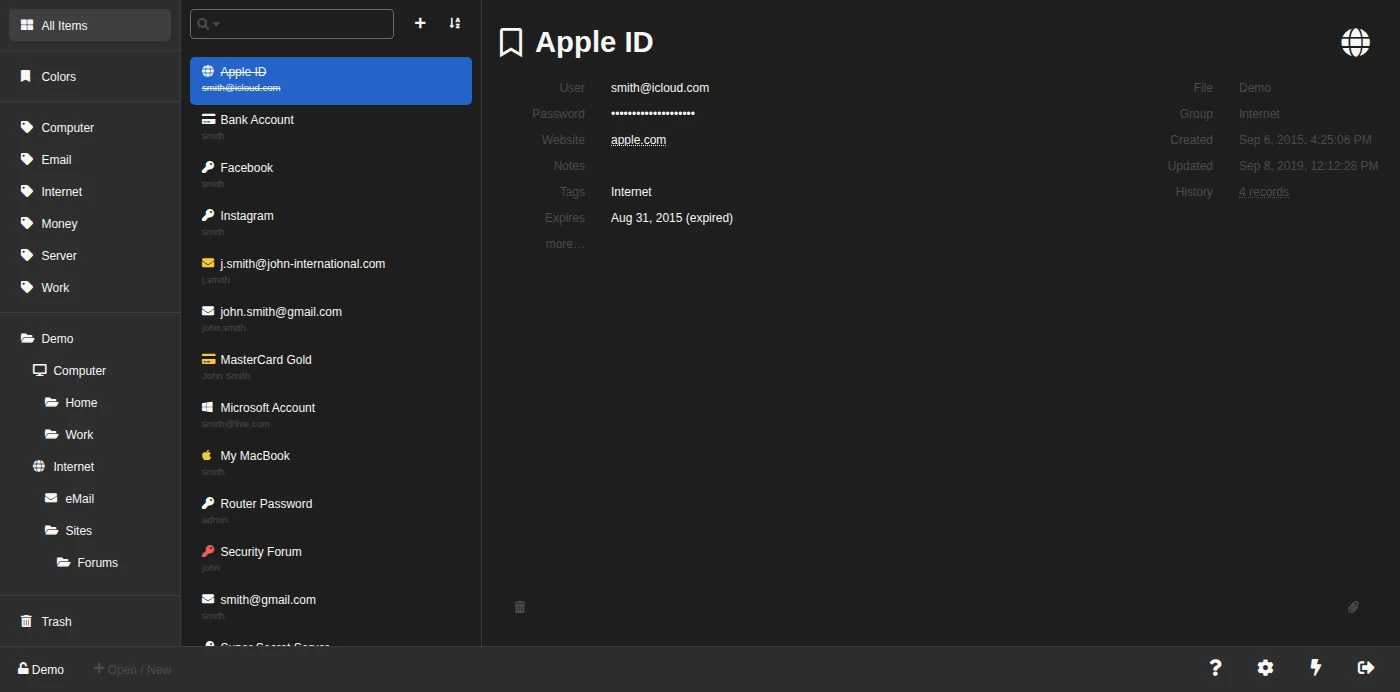
You already have a KeePass file. What you do not always have is the KeePass application — you are on a borrowed laptop, a locked-down work machine, or a phone, and your vault is sitting in cloud storage doing you no good at all. KeeWeb exists for that gap, and it opens your vault in a browser tab.
What it is
KeeWeb is a free, cross-platform password manager that reads and writes the same KDBX files KeePass created. It comes in two forms: a desktop app for Windows, macOS and Linux, and a web app you can use at app.keeweb.info or host yourself. Both are the same code, and both decrypt locally.
One framing is worth keeping in mind throughout. KeeWeb is a client, not a service: nobody at the project holds your vault, you point the app at a file, and you decide where that file lives.
Its core functions
Everything KeeWeb does follows from being a KDBX client with a storage picker attached. The list is short, and its shape matters more than its length.
- Opens and creates KDBX vaults, so an existing KeePass database works with no conversion and a new one stays portable to every other client.
- Puts the file where you tell it — on your disk, or on Dropbox, Google Drive, OneDrive, or your own server.
- Works offline, either as a desktop build or as a folder of static files you host yourself.
- Generates and fills passwords, with a plugin system and themes layered on for people who like rearranging things.
- Costs nothing, under the MIT licence, with no account to create and no paid tier to hit.
Everyday use
The first run is the entire learning curve. You open the app, say where your file is, unlock it with your master password, and from then on it behaves like every password manager you have already used.
Two habits turn it from usable into pleasant. Keep one vault rather than several, because the storage location is chosen per file and juggling three of them stops being convenient quickly. Save deliberately, because the web app holds your changes in memory until you write them back — which is exactly right on a borrowed machine and a trap if you simply close the tab.
Beyond the basics
Two things separate KeeWeb from the other KDBX clients. Both follow from the same fact: it is a web application that also ships as a desktop build.
- You can host it yourself. The distribution is a folder of static files, published on the
gh-pagesbranch and as Docker images, so putting your own copy behind your own reverse proxy is an afternoon at most. - It runs where you cannot install anything. A browser tab is the whole dependency list, and no other client in this category answers that case.
- Plugins and themes are first-class. They cover translations, extra storage backends and appearance, and none of them are required to use the app.
What the GitHub page actually says
This is where a reader in 2026 has to be careful, because the repository tells two stories at once. Reading it correctly decides whether you should install this today.
- The last stable release is v1.18.7, published on 18 July 2021.
- Two newer releases exist — v1.18.8 on 30 April 2026 and v1.18.9 on 8 May 2026 — and GitHub flags both as pre-releases.
- They come from a different maintainer than the 2021 builds, and the 2026 commits behind them are dependency bumps, an
npm audit fix, an electron-builder upgrade and repairs to the build pipeline. - The 2021 stable shipped 16 downloads, including Windows installers, macOS disk images and a
Verify.sign.sha256; v1.18.9 ships five, all of them Linux packages plus the self-hosting bundle, and v1.18.8 shipped none at all. - The project is not abandoned by the usual signals: 13.0k stars, 1.2k forks, 440 open issues, and a last push on 8 May 2026.
So the honest reading is that KeeWeb is being revived, not that it is back. Someone is doing the unglamorous work of making a five-year-old build compile again, and that work is real and visible. But if you are on Windows or macOS, the newest thing you can actually install is still the 2021 release — and the shape of that gap matches the project's own note that code signing certificates cost money.
Verdict
KeeWeb is the best answer to one specific question: how do I get at my KeePass vault on a machine where I control nothing? Nothing else in the KDBX family answers that, and the self-hosted static build makes it an answer you can own rather than borrow. As a daily driver on your own hardware it is a harder sell in 2026, because KeePassXC is doing everything it does and shipping stable releases while doing it.
Get it if you want a vault reachable from any browser, or you want to host that browser client yourself. Skip it if your machines are all yours, all installable, and all Windows or macOS — you would be choosing a 2021 binary over an actively released one for no gain.
Alternatives. KeePassXC is the desktop default and the one to use if installation is never a problem. KeePassDX and Strongbox cover the phones KeeWeb's browser tab covers awkwardly. And Vaultwarden is the other self-hosted route entirely, trading the single-file vault for a real server you have to keep alive.
Site and downloads: https://keeweb.info Source and releases: https://github.com/keeweb/keeweb

No comments yet