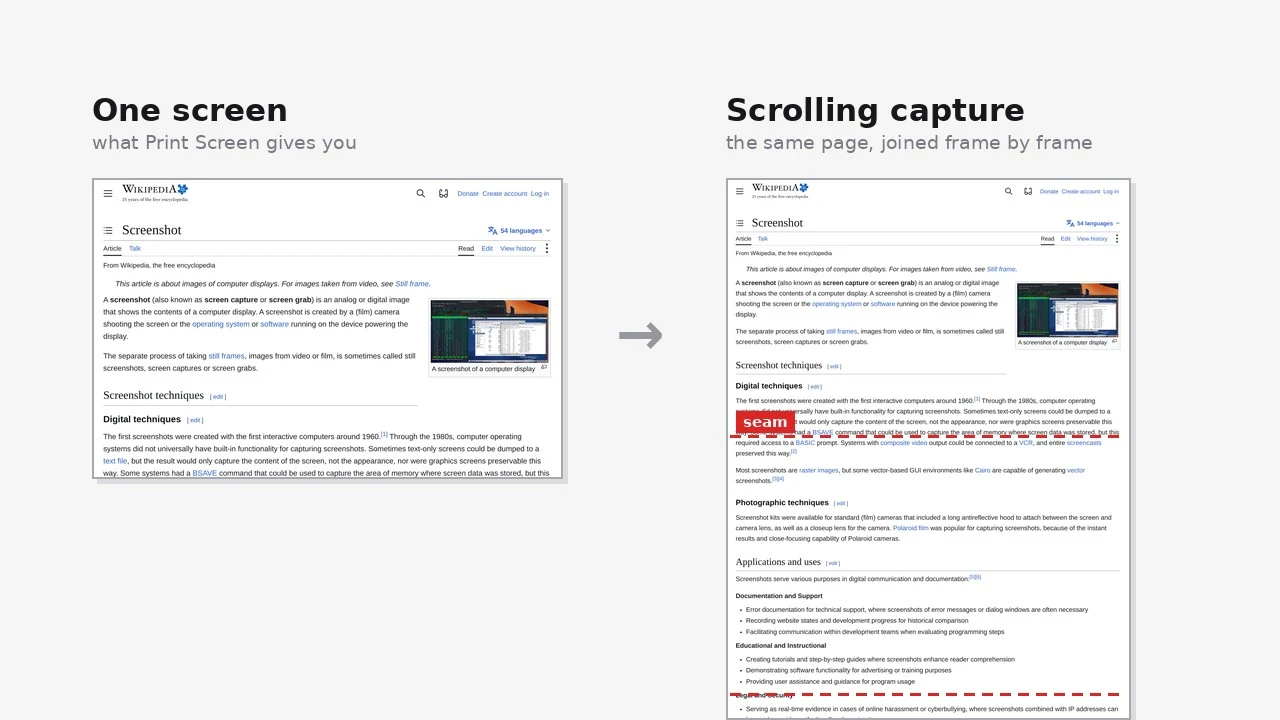
You need to show someone a settings page, a chat thread, or a spreadsheet that runs three screens deep. So you press PrtScn, scroll, press it again, scroll, press it again, and paste five overlapping images into a ticket that nobody will read in order. Your phone has solved this since roughly 2016; the desktop you do actual work on has not.
The one trick Windows never learned
The Snipping Tool in Windows 11 is a genuinely decent piece of software now. It does rectangle, window, full-screen and free-form snips, a delay timer, screen recording, text extraction from an image, and redaction. What it has never done, in Windows 10 or 11 or any Insider build to date, is capture content that extends past the bottom of the window.
That gap is the reason a whole category of third-party capture tools still exists on Windows. Every one of them solves the same problem in one of two ways: either something re-renders the full document for you, or something scrolls the window and sews the frames together. Which of the two you get matters more than which brand you install.
If the long thing is a web page, you may already be done
Before installing anything, check whether the content lives in a browser tab. All three major browsers on Windows can export a full page natively, and none of them stitches anything.
- Edge —
Ctrl+Shift+Sopens Web capture, then choose Capture full page. Available since Edge 87 on Windows and macOS. - Firefox — right-click an empty part of the page, choose Take Screenshot, then Save full page in the top right.
- Chrome — open DevTools, press
Ctrl+Shift+Pin it, and run Capture full size screenshot.
Prefer these when you can, because they are not photography. The browser lays the document out at full height and draws it once, so there is no seam to get wrong, no duplicated sticky header, and text stays sharp at any page length. The catch is that images below the fold may not have loaded yet, and pages that recycle rows as you scroll — long chat logs, huge tables — can come out with holes.
ShareX, for everything that is not a browser tab
ShareX is the free answer for the other 70% of long content: a PDF reader, a settings panel, a log viewer, a spreadsheet, a chat client. It is GPL-3.0, Windows-only, and still shipping — v21.0.0 landed on 3 July 2026. Scrolling capture sits under Capture → Scrolling capture, and you can bind "Start/Stop scrolling capture" to a hotkey. You then drag a region, and it scrolls and captures until the content stops moving.
Under the hood it is deliberately dumb, which is why it works nearly everywhere. ShareX takes one screenshot, scrolls, takes another, compares the two to find the overlap, trims the repeated part and appends the rest. When it finishes, a status dot tells you how much to trust the result: green means clean matches, yellow means it used the best imperfect match it could find, red means the first two frames would not combine at all and it gave up.
- Static furniture — a sticky header, a footer, a sidebar. It never moves between frames, so the matcher finds false overlap and the seam lands in the wrong place.
- Animated elements — a video, a GIF, a spinner. It changes between frames that are supposed to be identical.
- Hover effects — the cursor sitting over a row that highlights, so the "same" row looks different in two frames.
The fix for all three is the same and takes two seconds: drag a tight region around the content itself rather than the whole window, and park the mouse over the scrollbar at the top of the screen before you start. Most red indicators come down to one of those two habits being skipped.
The ones that cost money
- Snagit — $39 per user per year, subscription only since the 2025 release; one licence covers Windows 10/11 and macOS 14+. Its scrolling and panoramic capture is the most reliable in the category, and the annotation editor afterwards — arrows, callouts, numbered steps, blur — is what you are really paying for if you write documentation.
- PicPick — free for personal, non-commercial use; Pro is $30 per year with a lifetime option, and covers two devices. Windows only. Scrolling-window capture sits alongside a colour picker, a pixel ruler, a protractor and a whiteboard, which makes it the best-value pick for someone who also measures and marks up UI.
- FastStone Capture — $29.95 once, 30-day trial, version 11.3 as of July 2026. No subscription, tiny, captures scrolling windows and web pages, and has outlived most of its competition by not changing.
Paying gets you two things that free tools genuinely do not have: better matching inside stubborn native applications, and an editor good enough that you never open a second one. If you take three long captures a year, that is not worth $39. If you write manuals, it is worth it by the second week.
Why the seam goes wrong
Every tool in this article borrows the same vocabulary, mostly from panorama photography, and the words tell you which of the two methods a tool is using. That is worth knowing before you blame the tool.
| Term | Where you meet it | Why it is called that |
|---|---|---|
| Scrolling capture | ShareX, PicPick | The tool drives the scrollbar for you, then joins the frames |
| Full-page capture | Edge, Firefox, Chrome | The renderer draws the whole document at full height; nothing is joined |
| Panoramic capture | Snagit | Borrowed from photography — you pan by hand and it records the sweep |
| Stitching | Everywhere | Overlapping frames sewn along a seam, exactly as in a panorama |
| Region selection | ShareX, PicPick | You draw the box, which is also how you exclude the furniture |
| Status indicator | ShareX | Green / yellow / red: how confident the matcher was, not whether it ran |
| Sticky header | CSS position: sticky |
It sticks to the viewport, so it repeats in every frame — cause number one |
| Lazy loading | Long web pages | Images load only when scrolled near, so a fast capture catches empty boxes |
| Virtualised list | Slack, large tables | Rows are destroyed once off-screen to save memory, leaving gaps in a capture |
| Display scaling | Windows 125% / 150% | Fractional scaling resamples the frames, blurring the seam |
| Image combiner | ShareX | The manual fallback: shoot the frames yourself, let it join them |
Choose by the surface, not by the brand
If the content is in a browser tab, use the browser — it is free, instant, and structurally incapable of producing a bad seam. If it is anywhere else and you do this occasionally, install ShareX and learn the two habits above. If long captures are part of your job, Snagit is the one that fails least often and hands you a finished annotated image rather than a raw one.
The tools that get recommended loudest are usually the paid ones, but the honest ranking here is unusual: the free options are not the compromise. They are the correct default, and the money buys reliability in the awkward 10% of cases — much as Cap has done to the paid screen recorders.

No comments yet