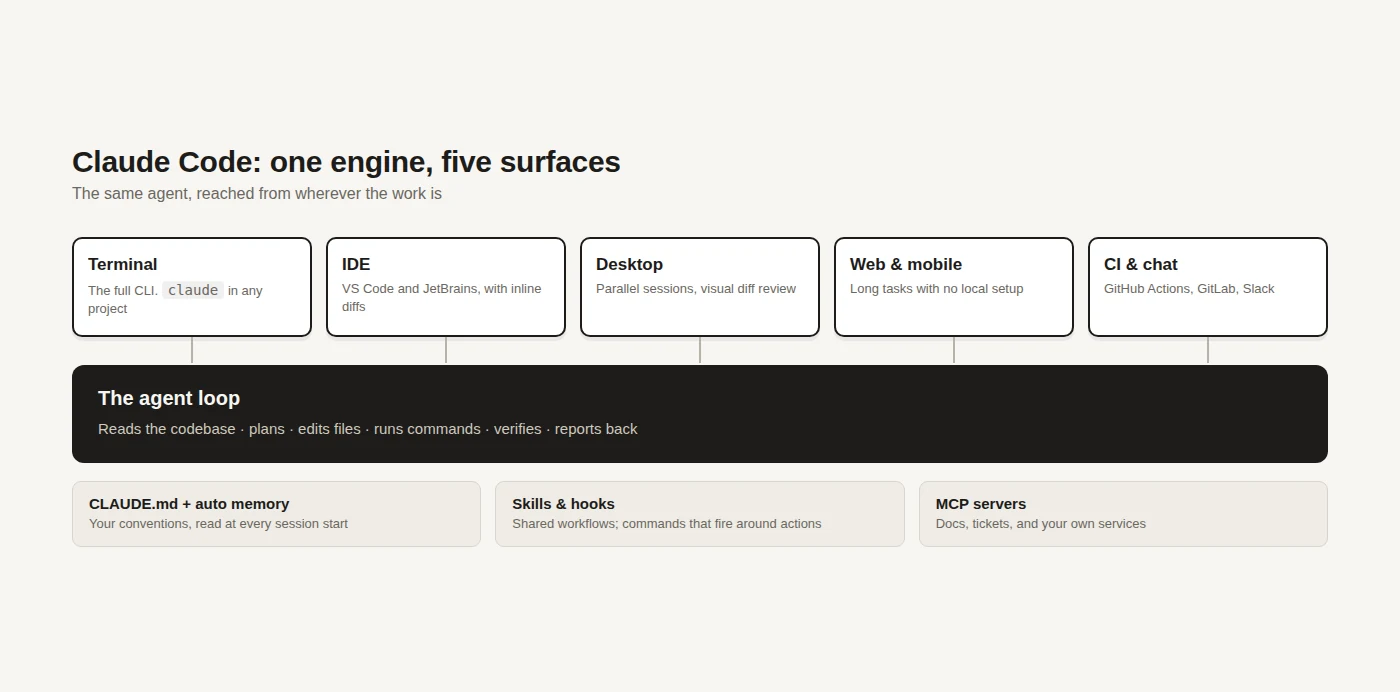
Most AI coding tools live in a sidebar and answer questions about the file you have open. Claude Code starts from the other end: it gets a shell, your repository, and permission to change things, and you talk to it about outcomes rather than snippets. That difference is the entire article, and it is why the first session feels less like autocomplete and more like handing work to someone.
What Claude Code is
Claude Code is an agentic coding tool that reads your codebase, edits files, runs commands, and works across multiple files to finish a task. You describe what you want in plain language; it explores the project, forms a plan, makes the changes, runs the tests, and reports what it did. The unit of work is a task, not a completion.
It is not tied to one place. The same engine runs in your terminal, in VS Code and JetBrains, in a desktop app, and in a browser — and your project instructions, settings and connected tools follow you between them.
Installing it
The terminal CLI is the fullest surface and the one everything else builds on. Install it with one line.
# macOS, Linux, WSL
curl -fsSL https://claude.ai/install.sh | bash

# Windows PowerShell
irm https://claude.ai/install.ps1 | iex
Package managers work too, with one tradeoff worth knowing: the native install updates itself in the background, while Homebrew and WinGet installs do not.
brew install --cask claude-code        # macOS; also claude-code@latest
winget install Anthropic.ClaudeCode    # Windows
Then start it inside any project. You will be asked to log in the first time, and that is the whole setup.
cd your-project
claude
The first session
Resist the urge to open with a big task. The habit that pays is to start by asking it to explain something you already understand — a module, a build step, a confusing test — because that shows you how it explores and how much it gets right before you trust it with edits.
Then give it something real and let it work. A good first request names an outcome and its verification in one sentence, like write tests for the auth module, run them, and fix any failures. Claude Code will read the relevant files, write the tests, run them, and iterate on what fails — and you review the diff at the end rather than every keystroke along the way.
What it can actually do
The surface is wide, and the useful way to hold it is by the kind of work rather than by feature name.
- Building and fixing. Describe a feature or paste an error and it traces the cause across files, implements the change, and verifies it — the ordinary case, and the one it is tuned for.
- The chores you keep postponing. Writing tests for untested code, clearing lint across a project, resolving merge conflicts, updating dependencies, drafting release notes. These are where it pays for itself fastest, because they are tedious rather than hard.
- Git and review. It stages changes, writes commit messages, opens branches and pull requests, and in CI it can review pull requests and triage issues through GitHub Actions or GitLab CI/CD.
- Piping and scripting. With
-pit is an ordinary Unix citizen:tail -200 app.log | claude -p "flag anything anomalous"works exactly as it looks, which makes it composable with everything else in your shell. - Connecting to your other tools. Through MCP, the open standard for wiring AI tools to external systems, it can read design docs, update tickets, or query your own services.
The commands you will actually type
Most sessions use a handful of commands and never touch the rest. These are the ones worth committing to memory on day one; everything else is discoverable by typing / and filtering as you go.
| Command | What it does |
|---|---|
claude |
Start a session in the current project |
claude "…" |
Start with the first instruction already given |
claude -c |
Continue the most recent conversation here |
claude -r "<session>" |
Resume a specific session by ID or name |
claude -p "…" |
Run one prompt, print the answer, exit — the scripting mode |
/help |
Every command, from inside the session |
/model |
Switch model, optionally with an effort level |
/context |
See what is filling the context window |
/compact |
Summarise the conversation to reclaim room |
/clear |
Start fresh with an empty context |
/plan |
Plan the change before any edit happens |
/diff |
Open the interactive diff viewer |
/usage |
Token usage and what it has cost |
claude doctor |
Diagnose a broken install or settings |
Two interface habits save more time than any single command. Typing / filters the command list as you go, and /status, /tasks and /usage run mid-turn without interrupting whatever Claude is already doing.
The functions worth learning properly
Seven features change how the tool feels, rather than adding one more thing it can do. Each is worth ten minutes of your attention.
- Plan mode —
/plan. Ask for a plan before any file is touched, read it, and only then let it run; this is the right default for anything spanning more than a couple of files. It turns "read a large diff and hope" into "approve an approach, then check it was followed". Start every non-trivial task here and you will throw away far fewer finished changes. - Context management —
/context,/compact,/clear. A long session fills its context window with files and command output, and answer quality slips before anything visibly breaks./contextshows what is taking up room,/compactsummarises the history to reclaim it, and/clearstarts over when the topic has genuinely changed. Reach for/clearbetween unrelated tasks instead of letting one session sprawl across a whole afternoon. - Permissions —
/permissions,--permission-mode. By default it asks before it acts, which is correct on day one and tiring by hour two. Add allow rules for the commands you are happy to see run unattended — your test runner, your formatter — or start a session in a mode such asacceptEditsorplanwith--permission-mode. The goal is to grant the boring things once, not to switch the guardrails off wholesale. - Resuming —
claude -c,claude -r,/resume. Sessions are durable, so closing the terminal is not the end of a piece of work.claude -cpicks up the most recent conversation in that directory,claude -rtakes a session by ID or name, and/resumebrowses earlier ones from inside a session. Give long-running work a name with-nand finding it again stops being a hunt. - Background sessions —
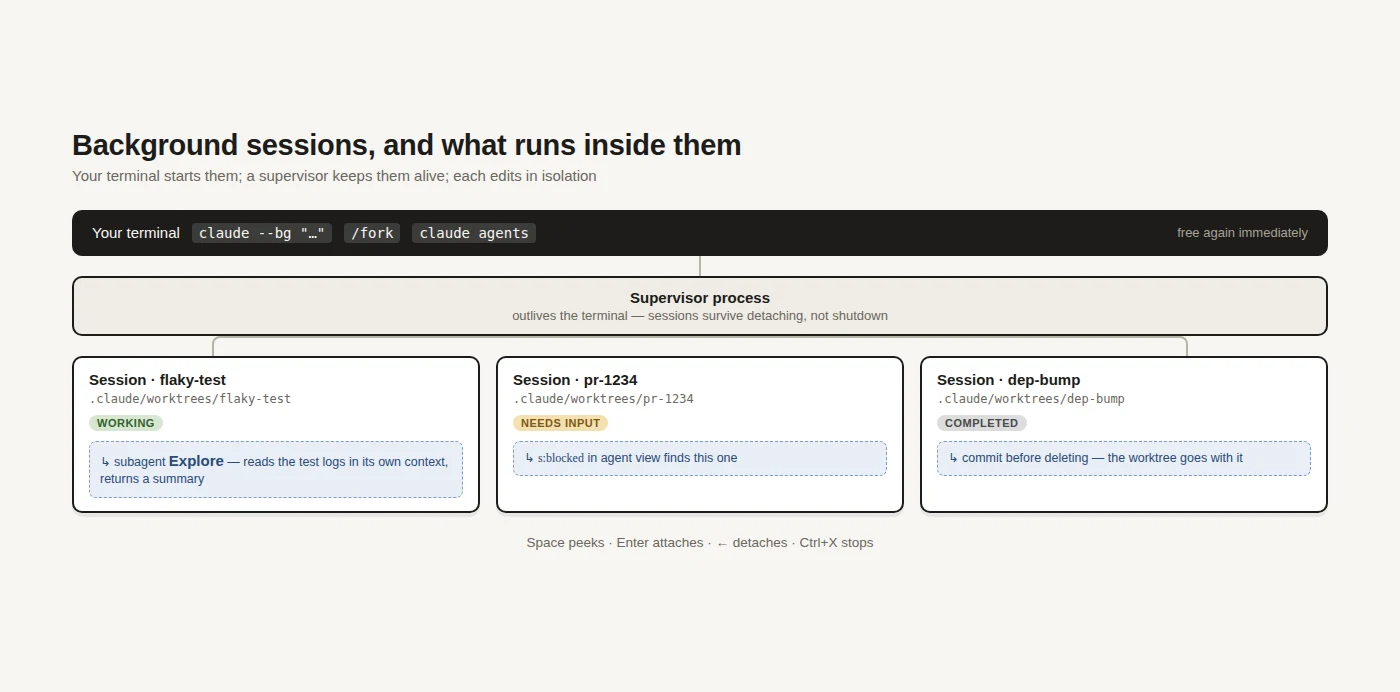
--bg,/background,claude agents. A long task does not need to own your terminal:--bgstarts a session detached,/backgroundpushes the current one into the background, andclaude agentsopens a view of everything running. From another shell,claude attach,claude logsandclaude stopdrive them individually. This is how one machine ends up doing three things while you review the first. - Subagents —
/agents,--agent,/tasks. A subagent is a specialist your conversation hands one task to, which works in its own context window and returns only the summary — so a broad grep or a long test log never lands in your history. Define one as a markdown file in.claude/agents/and it becomes shareable with the project like any other file. Both of these are a subject in themselves, covered in running it in the background and in parallel. - Review —
/code-review,/security-review,/diff. Reviewing the output is the part you cannot delegate, so it is worth making cheap./diffopens an interactive viewer,/code-reviewreads the diff for bugs and can apply its own findings with--fix, and/security-reviewlooks specifically for vulnerabilities. Run one of these before you commit and review stops being a wall of text you skim.
Everything else, briefly
The rest is worth knowing exists rather than learning now. You will meet each one at the moment you need it.
- Project setup —
/initwrites a startingCLAUDE.md,/memoryedits it later, and/hooksand/mcpmanage hooks and MCP servers. - Scale and schedules —
/batchorchestrates parallel changes across a codebase, and/looprepeats a prompt on a schedule; for the rest of the automatic-start story, see running Claude Code automatically. - Moving around —
/desktop,/teleport,/remote-controland/mobilemove a session between surfaces and devices. - Housekeeping —
/exportand/copyget text out,/configand/themeadjust the interface, and/bugand/feedbackreport problems with the session attached.
Teaching it your project
Out of the box it knows your code but not your conventions, and closing that gap is where most of the leverage is. Three mechanisms do it, and they escalate neatly from a text file to executable policy. Each one is optional, and the first is worth doing on day one.
CLAUDE.md— a markdown file in your project root, read at the start of every session. Put coding standards, architecture decisions, preferred libraries and review checklists in it; it also builds auto memory as it works, carrying learnings across sessions without you writing them down.- Skills — packaged, repeatable workflows your team can share and invoke by name, so
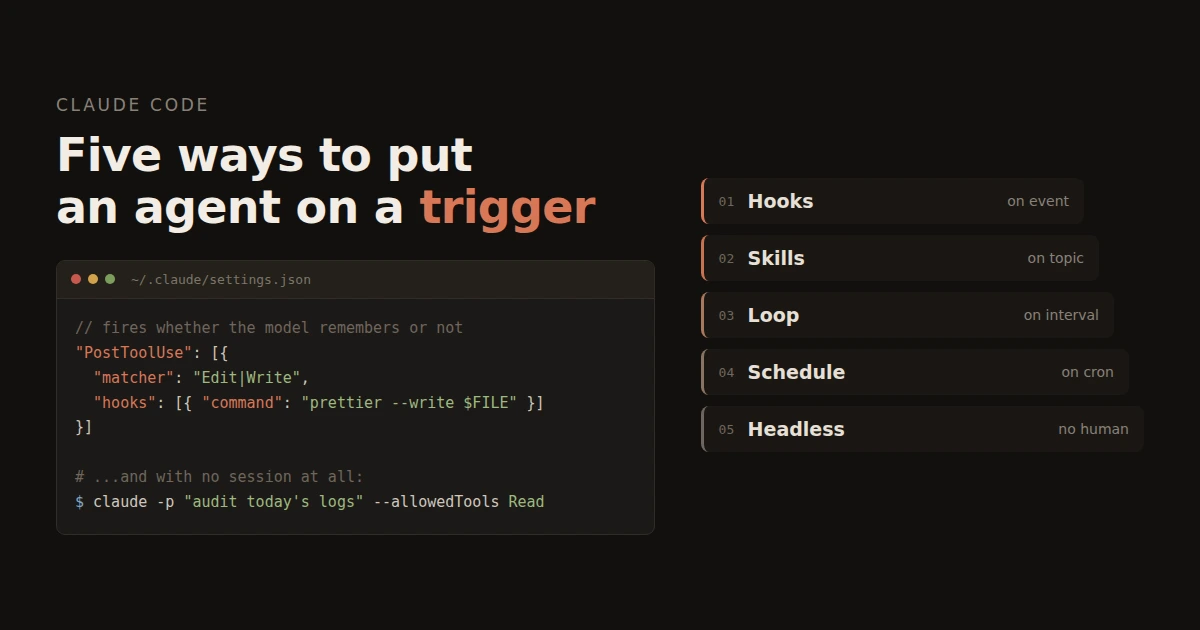
/review-pror/deploy-stagingmeans the same thing for everyone. - Hooks — shell commands that fire before or after its actions, which is how you enforce rather than request: auto-format after every edit, run lint before a commit.
Models and what it costs
Two things get confused here, so it is worth separating them. What you pay is a Claude subscription; which model runs is a setting inside it, and they are priced on different axes.
- Free — $0, and it does include Claude Code.
- Pro — $17/month billed annually, or $20 month to month.
- Max — from $100/month, at either 5× or 20× Pro's usage.
- Team — $20 per seat/month annually ($25 monthly), with a premium seat at $100 ($125 monthly); Enterprise is a seat price plus usage at API rates.
On the model side you are choosing depth against cost, and you switch at any time with /model. Four are worth knowing, listed here from heaviest to lightest.
- Claude Fable 5.1 (
claude-fable-5-1) — Anthropic's most capable widely released model, for the most demanding reasoning and the long-horizon agentic work where a single turn may run for many minutes. It behaves differently from the rest of the family in one way worth knowing before you reach for it: thinking is always on and cannot be disabled, so you control depth through effort levels rather than a token budget. It is also the most expensive by some way, which makes it a deliberate choice for a hard problem rather than a default. - Claude Opus 5 (
claude-opus-5) — the default heavy lifter and the right answer for almost all real work, with a 1M-token context window. - Claude Sonnet 5 (
claude-sonnet-5) — the cheaper everyday option, also at 1M context; a sensible default for routine changes and for subagents doing the reading. - Claude Haiku 4.5 (
claude-haiku-4-5) — fast and small at 200K context, for the trivial and the high-volume.
If you would rather pay per token than subscribe, an ANTHROPIC_API_KEY works instead. At the time of writing, per million tokens of input and output: Fable 5.1 is $10 and $50, Opus 5 is $5 and $25, Sonnet 5 is $2 and $10, and Haiku 4.5 is $1 and $5.
Verdict
Claude Code is the strongest current answer to "do the work, not the autocomplete", and the reason is architectural rather than clever: giving a model a shell, a repo and a verification loop turns out to matter more than the size of its context menu. The learning curve is not in the tool but in the delegation — writing a request that names an outcome and how to check it, and reviewing a diff instead of a keystroke. Budget a week of feeling slower before it clicks.
Get it if you maintain a real codebase with tests, or you have a backlog of tedious-but-not-hard work you keep deferring. Skip it if you cannot let a tool run commands in your environment, or your work is mostly greenfield design where there is no code for it to read yet.
Alternatives. GitHub Copilot and Cursor sit closer to the editor and the completion model, which is a genuinely different ergonomic rather than a worse one. n8n is the answer when the thing you want automated is a workflow between services rather than a change to code. And if you are going to run long agent sessions over SSH, tmux is the other half of the setup — it keeps the session alive when the laptop lid closes.
Documentation: https://code.claude.com/docs/en/overview Quickstart: https://code.claude.com/docs/en/quickstart
No comments yet